
Three Freezes a Second: Hunting a Linux Desktop Stutter Down to Qt and OpenSSL 4
My new CachyOS desktop's cursor froze for 80 ms three times a second. The trail led through a Stream Deck app polling KWin to a Qt + OpenSSL 4.1 hashing bug that gets slower the longer your session runs.

My desktop, Deadpool, had been on CachyOS for exactly one day when the mouse started feeling wrong. Not broken. Just off. Scrolling a page had a hitch in it, and dragging the cursor in a circle felt like it was catching on something. On a 240 Hz monitor that kind of thing is very noticeable, and once you've noticed it you can't stop noticing it.
This is the story of the afternoon I spent finding out why. It ended somewhere I genuinely did not expect: a hashing function in Qt, a brand new major version of OpenSSL, and a Stream Deck app politely asking my compositor what window I was looking at, three times a second. I worked through it with Claude Code riding shotgun, which made the measuring part a lot faster. The deciding still came down to the numbers.
(This is part 1. Part 2 is about what I did with the Stream Deck afterwards.)
Suspect #1: my own wallpaper
The new desktop has a live wallpaper I'm a little too proud of: a contour map drawn by a fragment shader across all four monitors, nudged ten times a second. If anything on a fresh desktop was going to be eating the GPU, it was my own toy.
It wasn't. The RTX 4070 Ti Super was sitting at 1% load and 43 W. To be sure, I switched to the still images and watched KWin (Plasma's compositor). KWin was using about 30% of a core either way. Wallpaper cleared, mild embarrassment avoided.
Suspect #2: a kernel that was yelling
The kernel log had something much more interesting in it: 191 warnings in two hours from the Wi-Fi stack, each with a full stack trace. They came from a USB Wi-Fi adapter (the one for the Steam Frame headset, which needs a newer kernel than Ubuntu had, and is the main reason I moved to CachyOS in the first place). It wasn't even connected to anything. It was just hearing radio traffic and choking on it. Every one of those warnings stalls a CPU core while it dumps its trace, and a few of them landed right in the middle of KWin.
Great suspect. I unplugged it. Still jittery.
Real problem, wrong culprit. Worth fixing, and it's now a known-issue note on the host page, but it wasn't the stutter.
Suspect #3: the mouse itself
"Feels like the mouse is skipping" could mean the mouse is literally skipping: a wireless receiver dropping packets. That's easy to test without guessing. The receiver shows up as a hidraw device I can read directly, so I recorded every report it sent while I moved the mouse in circles for 25 seconds:
24,770 reports in 25 s, median 1.00 ms apart, gaps over 6 ms while moving: 0A rock-solid 1000 Hz. Whatever was skipping, it was happening after the input arrived. That narrowed things down a lot: something between "the mouse moved" and "the screen showed it" was taking breaks.
Catching it on camera
At this point I'd been describing a feeling, so it was time to record it. I'd just installed gpu-screen-recorder for something else, so I recorded the main screen at its full 240 fps while drawing circles with the mouse.
The first recording was useless in an educational way. The direct KMS capture mode doesn't include the cursor on NVIDIA, because KWin draws the cursor on a separate hardware plane. So I had a perfectly smooth video of a perfectly still screen. Recording again through the desktop portal (-w portal) put the cursor back in, and then I diffed the video frame by frame:
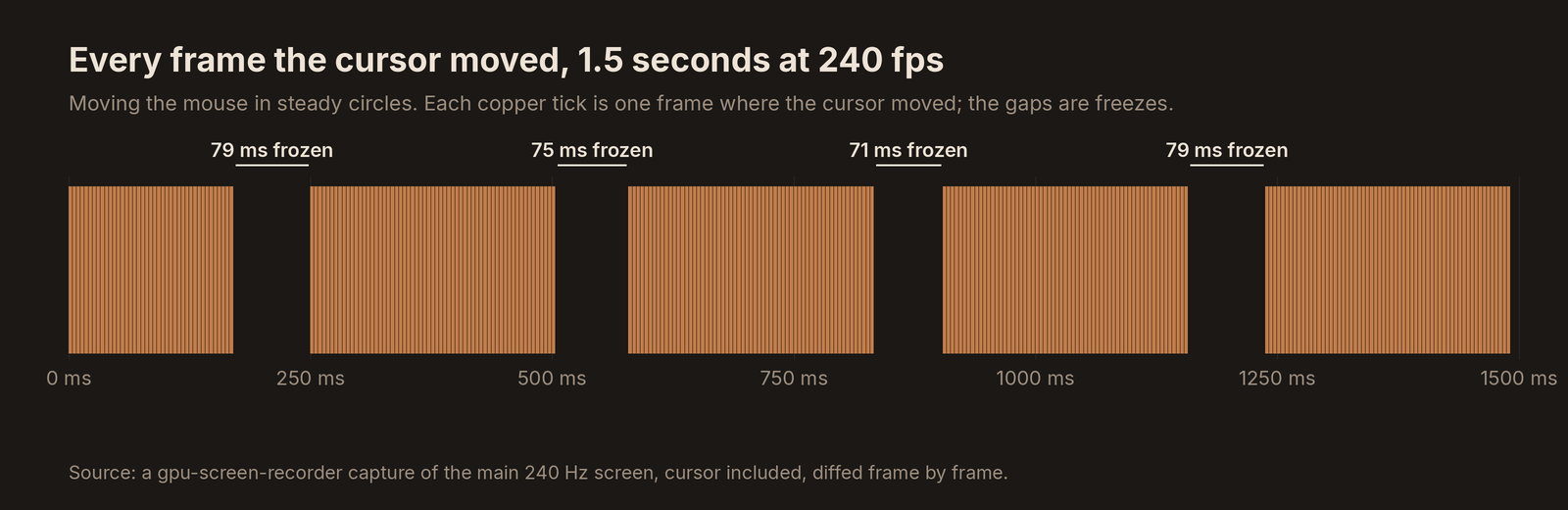
There it was. The cursor moved every single frame, then froze for about 19 frames (roughly 80 ms) and jumped ahead, about every 330 ms, like clockwork. Three freezes a second. That's not "the system is busy". A rhythm that regular means something is running on a timer.
Watching the compositor's heartbeat
If the cursor stops, the compositor stopped drawing it. I sampled the state of KWin's main thread 200 times a second straight out of /proc, and the same rhythm fell right out of it: KWin's main thread was busy for 72 to 97 ms straight, about every 330 ms. That one pattern also explained KWin's mysterious ~30% CPU use. It wasn't waiting on the GPU. It was doing some chunk of CPU work, on the thread that draws the cursor, three times a second.
My first theory was the classic one: something making KWin re-probe the monitors, which means reading each display's EDID over the cable, which is slow. With four monitors on three different refresh rates, that seemed plausible. But udevadm monitor showed no hotplug events at all. Next theory: something on the desktop message bus was asking KWin to do work. So I watched what got sent to KWin over D-Bus:
dbus-monitor --session "destination='org.kde.KWin'"Every ~330 ms, like a metronome:
member=loadScript   string "/tmp/kdotool-jB3Uxl"   string "kdotool-lib-1794339358447"
member=run
member=result
member=stop
member=unloadScript
Something was loading a fresh KWin script, running it, reading the answer and unloading it, three times a second. The D-Bus connection numbers were past 58,000 since login. That's what kdotool does: on KDE Wayland there's no "which window is focused?" call a normal program can make, so it asks by injecting a tiny script into KWin.
Nothing running had a kdotool process, though. It was built in as a library. I searched the binaries of everything running for the string kdotool-lib, and got one hit: OpenDeck, the app that runs my Stream Deck. It polls the active window so it can switch button profiles per app. I have no per-app profiles. It polls anyway.
Correlation isn't proof, so I did the cheap and decisive thing: froze OpenDeck with kill -STOP for five seconds and watched KWin.
before:   busy runs over 30 ms: 11   KWin busy 34%
paused:   busy runs over 30 ms: 0    KWin busy 11%
resumed:  busy runs over 30 ms: 12   KWin busy 34%
Case closed? I patched OpenDeck to only poll when it actually had per-app profiles or its window was open, built it, and the stalls vanished. KWin dropped to 4% CPU. The mouse felt like butter again. Victory lap.
"Why is nobody else complaining?"
Then I went to write up an upstream PR and stalled on a simple question. OpenDeck has a lot of KDE users. I searched their Discord and nobody was talking about stutter. How could a bug this obvious only hit me?
So I measured the thing kdotool does in isolation: load, run and unload a KWin script whose entire body is print("hi").
| Step | Deadpool |
|---|---|
| A plain D-Bus call to KWin | ~4 ms |
| Load the script | ~5 ms |
| Run a script that prints "hi" | 80 to 88 ms |
| Unload it | ~5 ms |
Eighty milliseconds to print "hi". That can't be normal. Luckily I had a control group: Crusher, my old laptop, which I'd installed CachyOS on from the same USB stick the day before. Same KWin, same Qt, same kernel. Crusher ran the same test in 7.8 ms.
Ten times faster on a laptop. The obvious differences were hardware: NVIDIA versus Intel, four monitors versus one. But there was one package difference, too. Deadpool had installed the day's updates at noon, including a rebuild of qt6-base, and Crusher hadn't. And I'd first noticed the stutter that afternoon. Suspicious! So I updated Crusher, rebooted it and re-ran the test.
Still fast: 8.5 ms. Update cleared, apparently. Hold that thought, because it's the most instructive mistake of the whole day.
Profiling the compositor
Out of guesses, I profiled KWin while it ran a few of these scripts. (That needed sudo perf: KWin carries the cap_sys_nice capability so it can use realtime scheduling, which makes the kernel refuse to let a normal user attach a profiler to it, even your own.)
88.64%  libcrypto.so.4
   38.74%  OPENSSL_sk_value
   25.99%  OPENSSL_sk_num
Eighty-nine percent of KWin's time, running a one-line script, was inside OpenSSL. A compositor printing "hi" has no business doing cryptography, so I followed the call chains back out:
KWin runs a script
 → Qt's JavaScript compiler checksums the compiled code     (QV4::Compiler::JSUnitGenerator::generateUnitChecksum)
   → QCryptographicHash, which this Qt build routes through OpenSSL
     → OpenSSL fetches the hash algorithm and loads/unloads a "provider"
       → ...and walks an internal list (OPENSSL_sk_value / sk_num)   ← 89% of the time
Walking a list that slowly means a long list. And a list that's long on Deadpool but short on Crusher, with identical software, smells like something that grows over time.
The thing that grows
Here's the thought I asked you to hold. When I updated Crusher and rebooted it, I gave it a fresh KWin. If the cost builds up per script run, a fresh KWin would look fast no matter which Qt it had. Meanwhile Deadpool's KWin had been up for hours, with OpenDeck feeding it three scripts a second.
Easy to test: run lots of scripts on Crusher and watch.
| Scripts run on Crusher's KWin | Median time to run one |
|---|---|
| 250 | 5.0 ms |
| 1,500 | 8.7 ms |
| 3,000 | 15.6 ms |
| 4,500 | 21.3 ms |
Steady growth, about 4 ms per thousand runs, and it carried over between my test runs because it lives inside the KWin process. Do the arithmetic for Deadpool: OpenDeck's three polls a second over about two and a half hours is around 26,000 script runs. 5 ms plus 26 × 3 ms is about 83 ms. I'd measured 84.
Then I took KWin out of the picture entirely. A ten-line C++ program that does nothing but create a QCryptographicHash, hash 256 bytes and throw it away, in a loop:
for (int i = 0; i < 10000; ++i) {
    QCryptographicHash h(QCryptographicHash::Sha256);
    h.addData(data);
    (void)h.result();
}
And then the same binary against the previous Qt build, pulled from the Arch Linux Archive (signature checked) without installing it:
| Qt build | OpenSSL | Cost per hash |
|---|---|---|
| 6.12.0-3 (before the update) | 3.5 | ~30 µs, flat over 60,000 hashes |
| 6.12.0-4 (installed that day) | 4.1 | 884 µs, then 2,635, then 5,891, then 12,293 µs and still climbing |
Hashing 256 bytes should take about a microsecond. With the new Qt and OpenSSL 4.1, it starts at nearly a millisecond and gets worse every time you do it.
And it's a known bug. Qt 6.12's QCryptographicHash loads and unloads OpenSSL's default provider for every hash object, and OpenSSL 4.1 leaves entries behind on each unload, so every lookup walks a longer list. Qt already has a fix, QTBUG-148575 ("don't unload loaded providers"). Other projects found it the painful way: the Strawberry music player's startup went from seconds to over 25 minutes on a big library, and Mudlet's password hashing took seconds. Arch's qt6-base 6.12.0-4, the rebuild for OpenSSL 4, landed in my noon update. So the timing was the update after all. My Crusher test just couldn't see it, because a fresh process hides a bug that accumulates.
So whose bug was it?
Everybody's a little, nobody's entirely:
- Qt and OpenSSL 4.1 own the actual bug: a cost that grows forever.
- KWin hashes every script it compiles, which is perfectly reasonable.
- OpenDeck asked KWin to compile a script three times a second whether or not it needed the answer. Even on a healthy system that costs the compositor 5 to 10 ms each time, a dropped frame or two at 240 Hz. Here it simply turned a slow leak into a flood.
That's also why nobody else was complaining: you need the brand-new OpenSSL 4 rebuild, KDE on Wayland, something that polls KWin constantly, and a session that's been up for a while. A 240 Hz monitor helps you notice. Plenty of people will hit it in some form. Most will put it down to "Wayland being Wayland" and reboot.
Speaking of which, the fix until Arch ships a Qt with the patch is beautifully low-tech: log out or reboot regularly. A fresh KWin starts at 5 ms again.
What I'd tell myself at the start
- Turn the feeling into a measurement first. "It feels jittery" went nowhere. "The cursor freezes for 80 ms every 330 ms" pointed straight at a timer.
- Clear the boring suspects with data, not vibes. GPU load, raw mouse reports and a wallpaper A/B each took minutes and each removed a whole branch of the search.
- Pause the suspect.
kill -STOPandkill -CONTis the cheapest causation test there is. - When the comparison machine looks clean, check that it's really comparable. Same packages isn't the same state. My "control" had a fresh process. That one almost sent me home with the wrong answer.
- Reproduce it outside the big system. The ten-line C++ loop turned "something deep in my compositor" into a two-row table anyone can check.
As for the Stream Deck app at the start of the chain: I could have kept my patched OpenDeck and moved on. I didn't, and it wasn't really about this bug. That's part 2.