Isley: A Self-Hosted Cannabis Grow Journal
How I built Isley — a self-hosted grow journal in Go — to consolidate sensor monitoring, grow documentation, and harvest tracking into one app, and what a year of daily use has looked like.
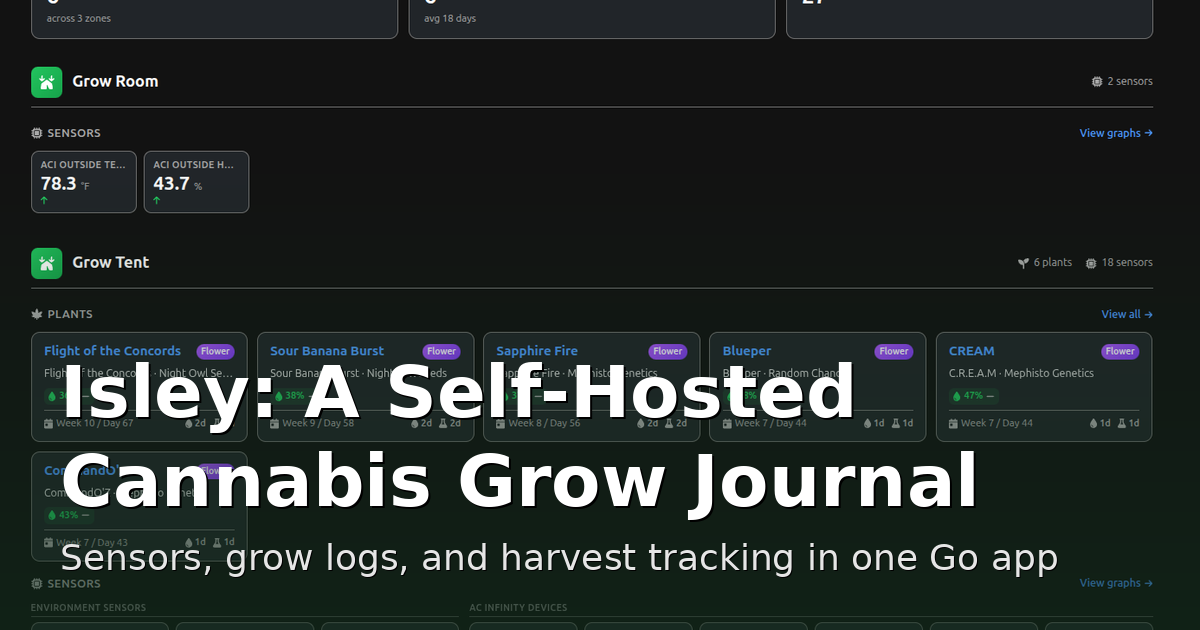
Every grow I've ever done generated the same mess of records: temperature readings trapped in a vendor's phone app, watering dates scribbled in a notebook, a folder of photos with names like IMG_4471.jpg, and a spreadsheet I swore I'd keep up to date and never did. Each tool knew one slice of the story. None of them talked to each other, and half of them lived in someone else's cloud.
So I built Isley — a self-hosted grow journal that pulls all of that into one place. It tracks plants from seed to harvest, ingests data from my environmental sensors in real time, manages a seed inventory, and keeps every photo and activity log attached to the plant it belongs to. It's written in Go, ships as a Docker container, and runs entirely on my own hardware. This is a look at what it does and how it's put together.
The dashboard
The home screen is the part I look at most — it's the "is everything okay?" view. At the top are the headline numbers: active plants, how many are in flower, and how many sensors are reporting. Below that, everything is organized by zone, so my grow room and grow tent each get their own section with their own plants and sensors.
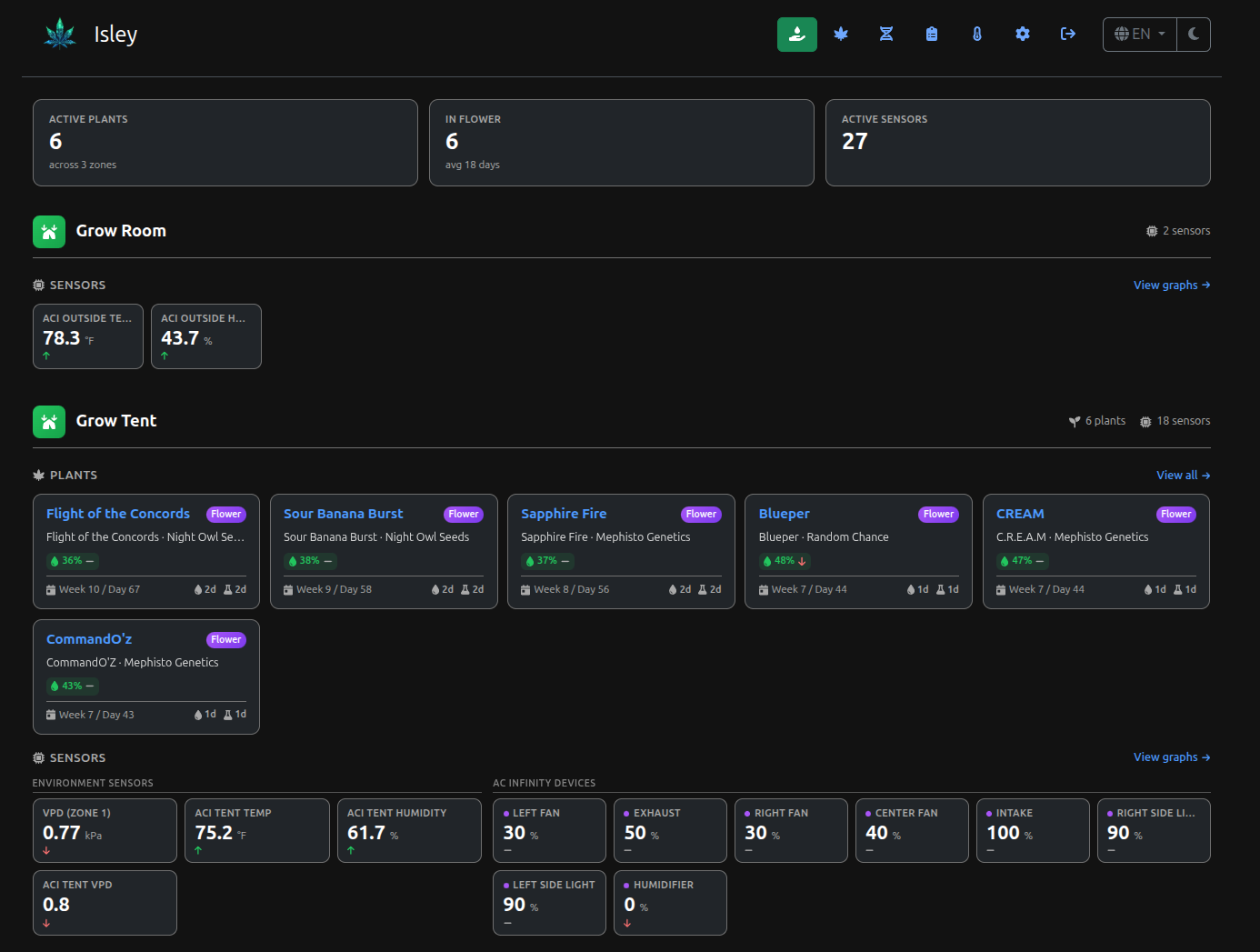
Each plant gets a card showing its strain and breeder, current growth stage, soil moisture, how far into the cycle it is (week and day), and little indicators for when it was last watered and fed. Underneath the plants, the zone's environment sensors are laid out as live tiles — VPD, tent temperature and humidity — alongside the current state of every AC Infinity device: fan speeds, exhaust, intake, lights, and the humidifier, each with its current percentage. At a glance I can tell whether the tent is dialed in or whether something drifted overnight.
Plant pages and grow logs
Click into a plant and you get its whole life story on one page. There's a timeline across the top that walks through the stages — germination, planted, seedling, veg, flower — so you can see where the plant is in its cycle and how long each phase took. Below that is an image gallery, and a details panel with the strain, breeder, zone, start date, current day count, and the last time it was watered or fed.
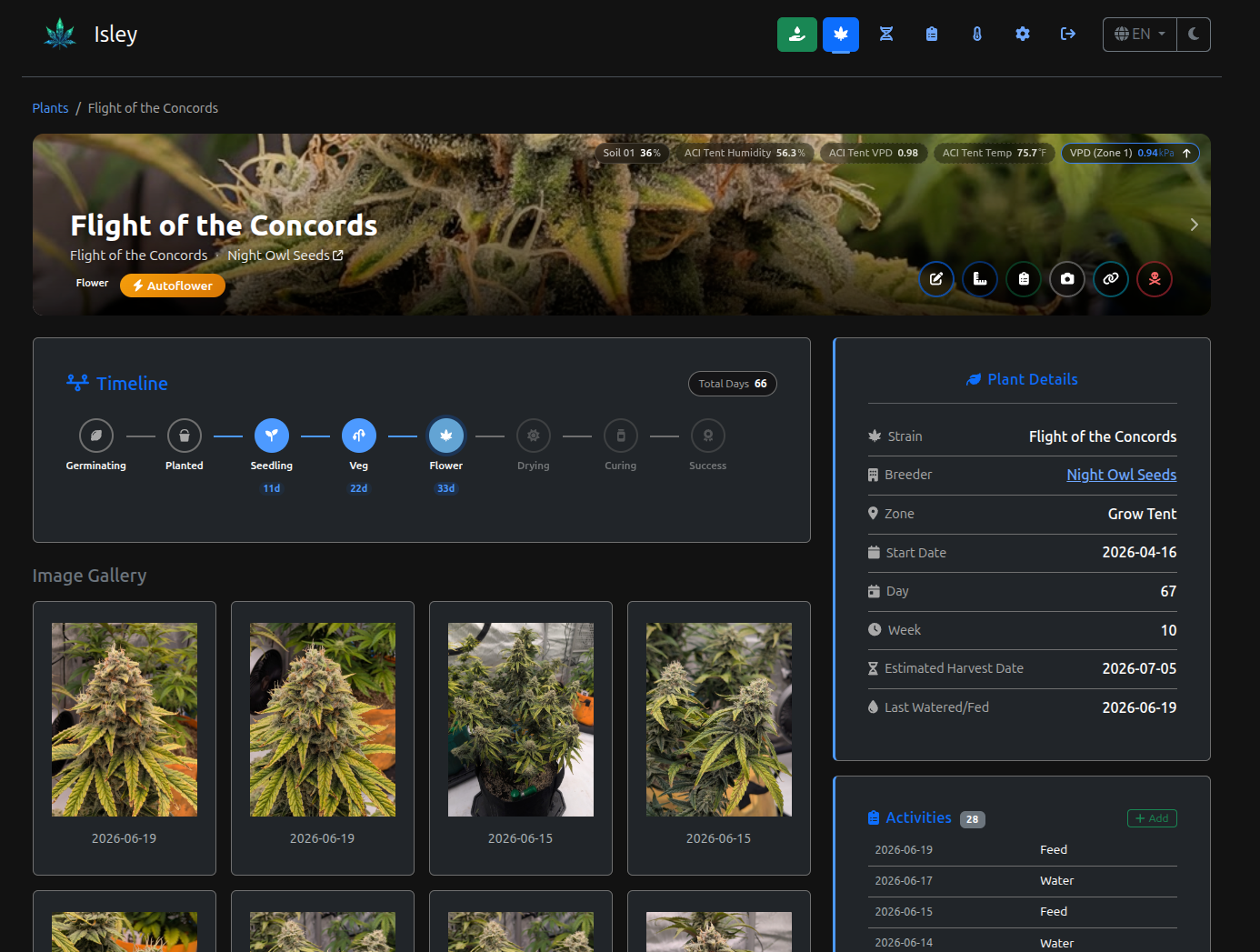
The activity log is the heart of it. Every watering, feeding, and note gets timestamped and attached to the plant, and the activity types are customizable so you can log whatever you actually care about. Photos can carry captions, text overlays, and watermarks, which is handy when you want to share a shot without stripping it of context. After a few weeks the timeline turns into exactly the grow record I always meant to keep and never did — except this time it keeps itself.
Seed inventory
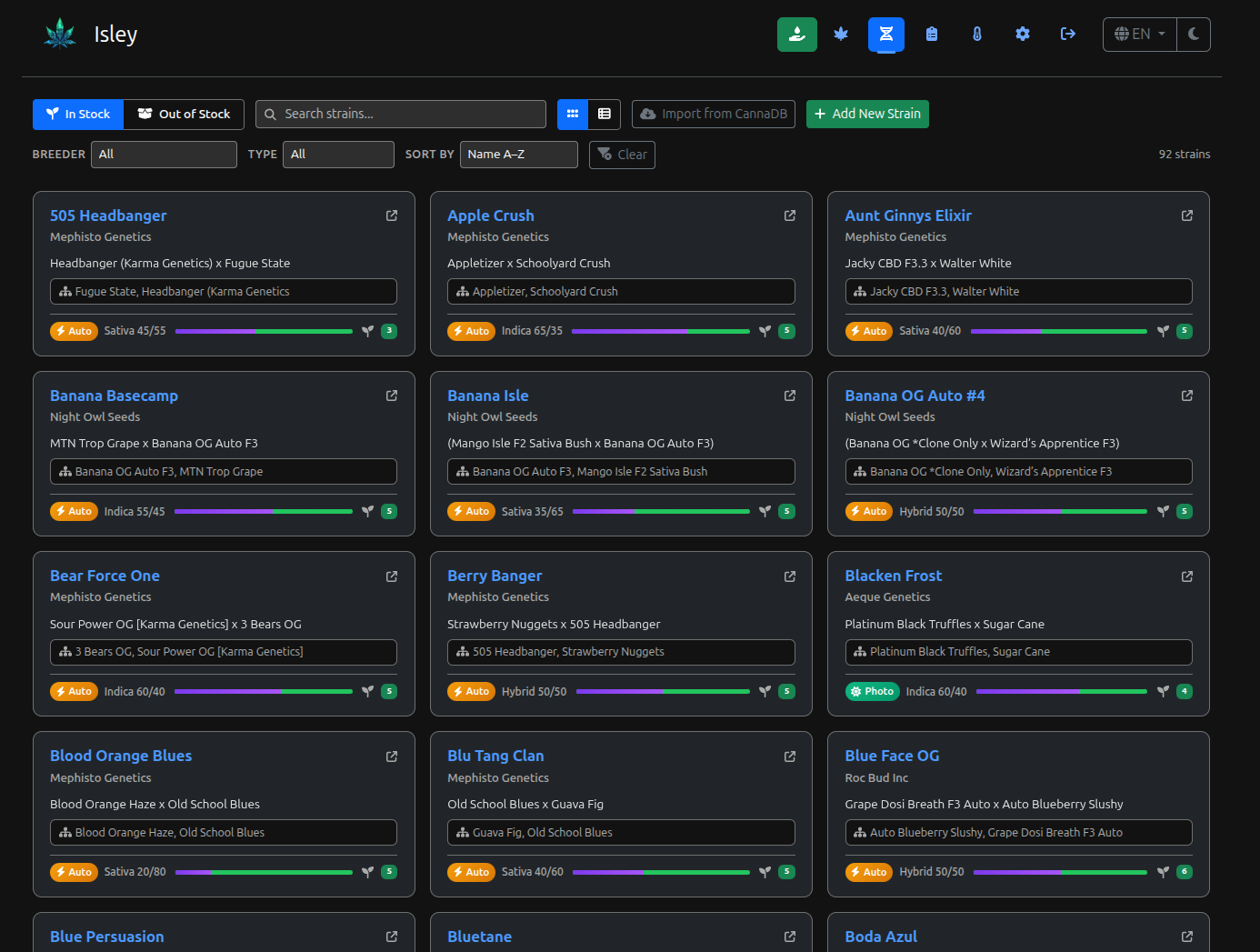
The other half of the app is the seed and strain library. Before a plant ever goes in the ground, the strain lives here: breeder, type, autoflower vs. photoperiod, and whether it's currently in stock. There's a search box and an in-stock/out-of-stock filter, so when it's time to start a new grow I can actually see what's in the seed fridge instead of digging through a pile of breeder packs.
Sensors and integrations
Real-time monitoring is what pulled me into building this in the first place, and Isley speaks to a few different sources:
- AC Infinity — It links to a UIS-series controller through AC Infinity's cloud API and pulls temperature, humidity, and per-port device speeds. You link your account once; Isley stores only the API token, never your password, and polls on a configurable interval (60 seconds by default).
- EcoWitt — This one talks to the hub over its local HTTP API, so no cloud round-trip. Point Isley at the gateway's IP (a GW1000/1100/2000) and it discovers the soil-moisture and indoor channels.
- Anything else — There's a generic
POST /api/sensors/ingestendpoint protected by an API key. If you can make an HTTP request, you can feed it data — I've seen it used with ESP32 boards, Arduino, Home Assistant, and Node-RED.
All of that history is queryable for charting, so the dashboard tiles aren't just live values — you can pull up trends over a date range and watch how a change to the exhaust fan plays out over the next few days.
The stack
Isley is a single Go binary (Go 1.25) served by Gin, packaged as a Docker image with a docker-compose setup. It runs on SQLite for a lightweight single-container deployment, or PostgreSQL for production — and if you start on SQLite and outgrow it, Isley will migrate your data into Postgres automatically on startup when it sees an empty Postgres database next to an existing SQLite file.
# docker-compose.postgres.yml — Isley + Postgres 16, port 8080
# First login is admin / isley (you're forced to change it)
services:
  isley:
    image: dwot/isley:latest
    ports:
      - "8080:8080"
    environment:
      ISLEY_DB_DRIVER: postgres
      ISLEY_SESSION_SECRET: "change-me-to-32-plus-random-bytes"
      ISLEY_SECURE_COOKIES: "true"   # behind an HTTPS reverse proxy
Production deployment is the usual self-hosted hygiene: put it behind Nginx or Traefik for TLS, set a real ISLEY_SESSION_SECRET, turn on secure cookies and HSTS, and cap your sensor-data retention so the database doesn't grow without bound. The built-in backup system produces portable .zip archives that move between SQLite and Postgres and can bundle your images and a chosen window of sensor history — so a restore on fresh hardware brings the whole journal back, photos and all.
The little things that make it daily-usable
- Guest mode — an optional read-only public view, so I can share a grow without handing out a login.
- A live overlay API —
GET /api/overlayreturns a JSON snapshot of plants and sensors, purpose-built for stream overlays. That's the seam where Isley feeds my 24/7 grow stream (which is its own project). - Webcam snapshots — periodic stills captured via FFmpeg.
- Multi-language — English, German, Spanish, and French.
- Mobile-responsive — because most of my logging happens phone-in-hand, standing in front of the tent.
A year in
The thing I didn't expect was how much the consolidation mattered. Individually, none of these features is novel — plenty of apps log waterings or read a temperature sensor. But having the strain history, the environment data, the photos, and the activity log all hanging off the same plant record means I can actually answer questions across a grow: was that the run where humidity spiked in week 7? Which phenotype of this strain finished faster? The data was always there in theory; it just lived in six different places that couldn't see each other.
It's also quietly made me a better grower. When something goes sideways, I can look back at exactly what the conditions were and what I was doing differently — and when something goes right, same thing. That feedback loop is the whole payoff of keeping records you'll actually revisit.
Community
The intersection of "people who self-host" and "people who grow cannabis at home" is not a huge Venn diagram, but it turns out there are enough of us to form a little community around this thing. I've started getting bug reports and pull requests from other growers running Isley, and it's genuinely cool to watch other people get value out of something I built to scratch my own itch.
What's next
Isley is under active development, so expect the occasional breaking change between releases — alerts and notifications with custom thresholds are the next thing on the list. The bigger idea I keep circling back to is a shared, community-driven strain database, so strain data isn't something every grower has to enter from scratch. That itch eventually grew into a project of its own — CannaDB — but Isley remains the place where my own grows actually get logged. If you want to poke at it, the code and docs are public:
- Repo: github.com/dwot/isley
- Docs: dwot.github.io/isley
It scratched my own itch first; if it scratches yours too, that's a bonus.